
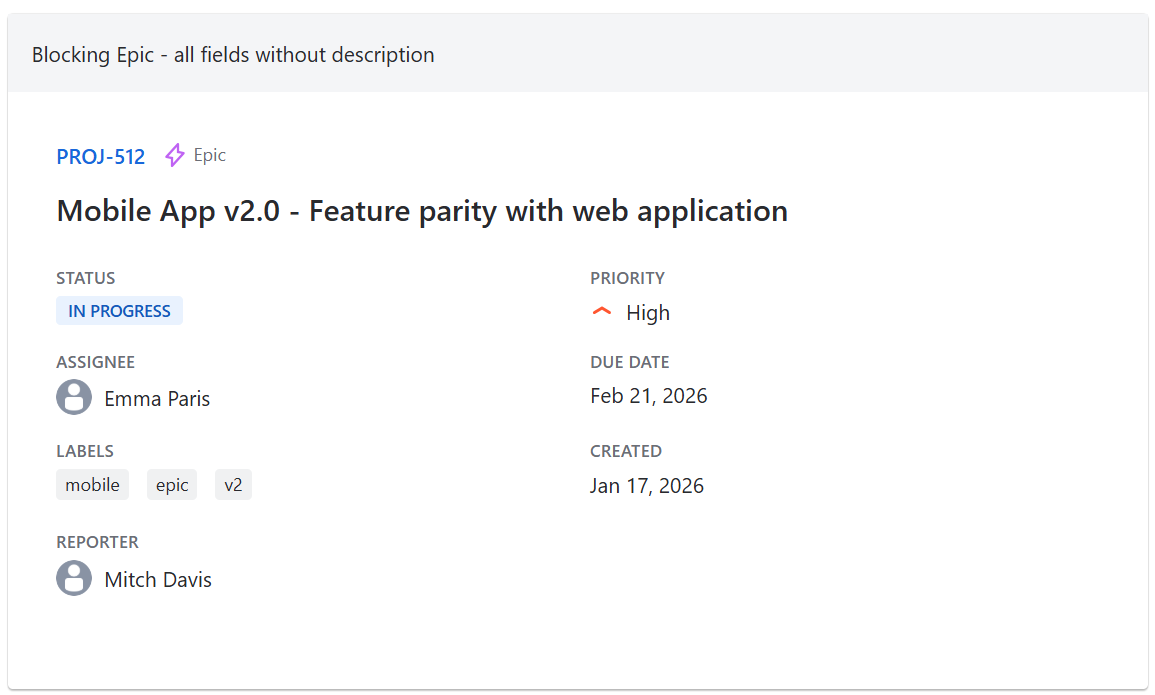
The gadget displays detailed information about a single work item in a focused card layout. The first match from the configured JQL query is shown with selectively togglable fields. The gadget can also cycle through several matching work items, one at a time.
Display fields
The following fields can be individually toggled on or off:
-
Work Item Type - icon and name
-
Summary - issue summary text
-
Status - color-coded status badge
-
Priority - icon and name
-
Assignee - with avatar (or "Unassigned")
-
Due Date - highlights overdue items in red
-
Labels - displayed as tags
-
Created date
-
Reporter - with avatar
-
Description - extracted from the work item's description field
Work item selection
The gadget shows the first work item matching the configured JQL query. Several presets are available:
-
Specific work item (by key)
-
Highest priority open in a space
-
Most recently updated
-
Assigned to me
-
Oldest unresolved
-
Custom JQL
-
Saved Jira JQL filters
Multiple work items
When "Number of work items" is set to 3, 5, or 10, the gadget shows the first matching work items one at a time, in JQL order. Use the previous and next arrows in the card header to move between them; the header also shows the current position, for example 2/5.
With "Rotate every" set, the card moves to the next work item automatically. Rotation pauses while the mouse is over the card, and a work item you pick with the arrows stays for a full interval.