
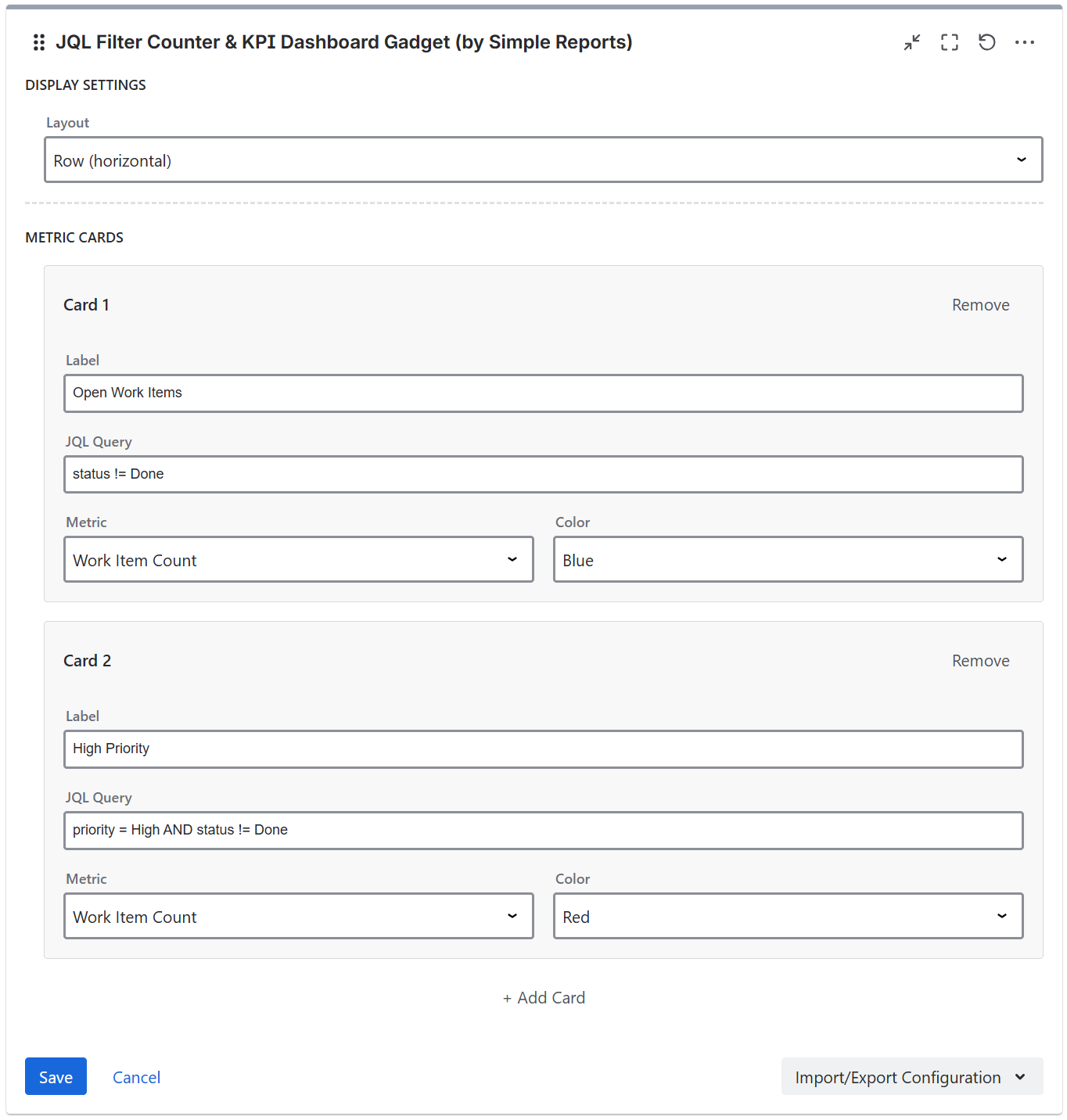
Layout - select how the metric cards are displayed.
Row layout displays cards horizontally in a single row with wrapping.
Grid layout displays cards in a 2-column grid format.
Metric cards
Each card has a header with the card number, a Hidden checkbox, and a Remove button. The Hidden option allows you to hide the card from the dashboard while still making its value available for formula cards to reference - useful for intermediate calculations.
Each card is configured with the following settings:
-
Label - the card title (e.g. "Open Bugs")
-
Value Type - the type of value to display (Work Item Count, Story Points Sum, Original Estimate Sum, Time Logged Sum, Remaining Estimate Sum, Formula)
-
Color - the card border color (blue, green, red, orange, purple, teal, gray)
-
JQL Query - the JQL query to filter work items for this card (shown when Value Type is not Formula)
Up to 8 cards can be added per gadget. Cards can be added or removed using the add/remove buttons.
Formula cards
Formula cards let you create derived metrics by referencing other cards' values. Instead of a JQL query, you enter an arithmetic expression using card references like C1, C2, etc. (matching the Card 1, Card 2 labels in the configuration).
For example, if Card 1 shows total issues and Card 2 shows resolved issues, you can create a Card 3 with the formula C2 / C1 * 100 to display a resolution rate percentage.
Supported operations: addition (+), subtraction (-), multiplication (*), division (/), and parentheses for grouping.
Formula cards also have a display format setting:
-
2 Decimal Places - always shows 2 decimal places (e.g., 66.67, 5.00)
-
Whole Number - rounded to nearest integer (e.g., 67, 5)
-
Percentage - 2 decimal places with % suffix (e.g., 66.67%)
Formula cards cannot reference other formula cards. If a formula references a card that has an error or does not exist, the formula card will display an error.
Time display format
When using time-based metrics (Original Estimate, Time Logged, Remaining Estimate), an additional setting allows you to choose the time display format:
-
Weeks
-
Days
-
Hours
-
Minutes
-
Seconds
-
Decimal hours
Story Points field
The gadget auto-detects the Story Points field. If your Jira instance uses a custom field for story points, you can specify the custom field ID manually.
JQL filter

Data supplied to the app can be filtered using JQL filters, with the gadget supplying some JQL presets.
If you are running Jira Cloud and want to use Adaptavist ScriptRunner JQL functions you should save them and use them as synchronized filters instead via JQL - filter = "enter name or id of the filter"
Import/Export Configuration
Use the Import/Export option in the gadget footer menu to save or restore gadget configuration as a JSON file. This is useful for duplicating gadgets or transferring settings between dashboards.