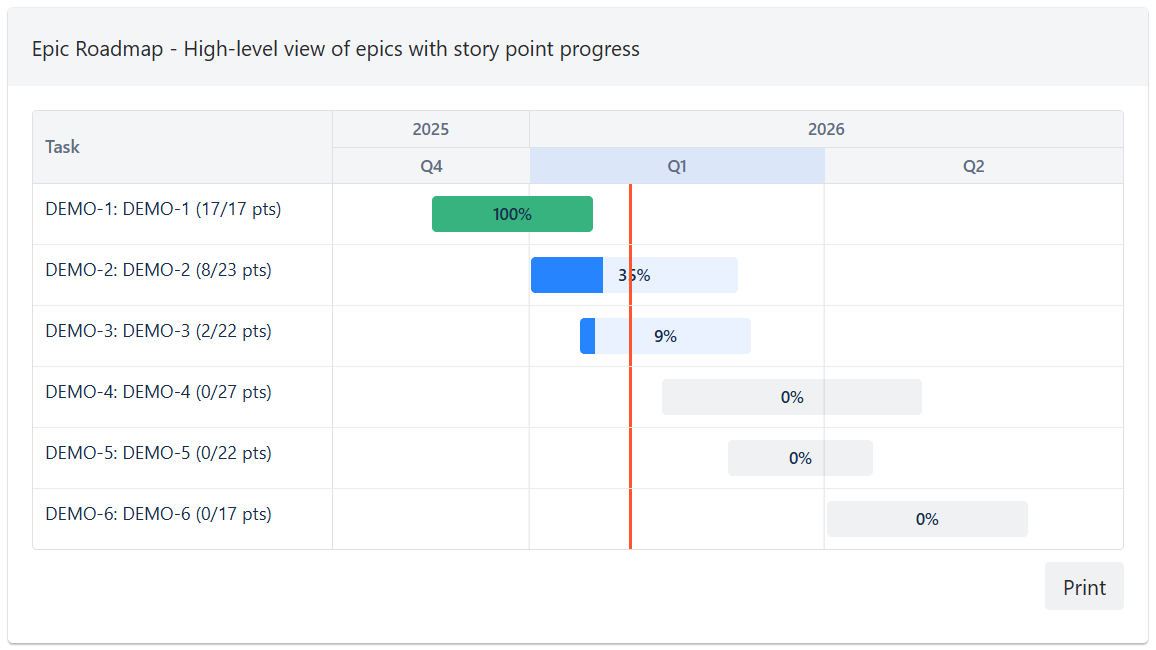
The gadget visualizes work items on a Gantt timeline, showing task bars with start and end dates. Tasks can be displayed individually or aggregated by various fields.
Aggregation modes
Work items can be grouped by the following fields:
-
Individual Work Items - no aggregation, one bar per issue
-
Epic
-
Version / Release
-
Team
-
Assignee
-
Component
-
Label
-
Space (Project)
-
Work Item Type
-
Priority
-
Status
-
Reporter
-
Creator
-
Custom fields of option/select type
Time scales
The timeline supports the following granularity levels:
-
Days
-
Weeks (default)
-
Months
-
Quarters
-
Years
Aggregate date range
When aggregating by a field, each bar spans from the earliest start date to the latest end date of the work items in that group.
Work items without a date value for the selected field do not affect the bar's position on the timeline. Not every work item in the group needs to have dates set — even a single work item with dates is enough to display the aggregate bar on the timeline.
In individual mode, each bar represents a single work item's date range.
Progress tracking
Each task bar shows a progress indicator based on the completion of child work items. Progress can be calculated using work item count or story points.
Task bars are color-coded by progress: gray when no progress, blue when in progress, and green when fully complete. A today marker line shows the current date on the timeline.
Action buttons
The gadget includes the following action buttons:
-
Print - print the gadget