
Overview
At our company, we prioritize the security, privacy, and compliance of your data. Our security-first approach ensures your data remains confidential, secure, and under your control at all times.
We employ industry best practices, maintain continuous monitoring, and follow strict security standards to safeguard customer data. This document outlines our security posture, policies, and controls.
Which apps this covers
This statement applies to the following apps, which are built from a shared codebase and handle data identically:
-
Simple Custom Reports & Charts for Jira
-
Simple Reports & Charts Lite for Jira
-
Status & Progress Report Gadget for Jira
-
Individual Velocity Report/Chart Gadget for Jira
-
Advanced Burndown Chart Gadget for Jira
-
Simple Timesheet & Worklog Dashboard Gadget for Jira
-
Time Tracking & Estimation Report Dashboard Gadget for Jira
-
Time in Status Report Gadget for Jira
-
Simple Gantt & Roadmap Timeline Dashboard Gadget for Jira
-
JQL Filter Counter & KPI Dashboard Gadget for Jira
Our other apps are built differently and publish their own data security and privacy statements in their own documentation spaces.
Cloud Version
Architecture & Data Flow
-
In-Jira Integration: The app is displayed inside Jira's interface, ensuring a seamless user experience.
-
Sandboxed Delivery: The app is delivered as static files that Atlassian serves into a sandboxed frame inside Jira, over an encrypted HTTPS connection. It can only reach destinations declared in its Forge manifest, and Atlassian enforces that at the platform level.
-
Local Processing: The Jira data the app needs is read in your browser and processed there. Your Jira content is never transmitted to us or to any third party.
-
No External Storage: We do not store Jira data on our servers. We operate no application server for these apps at all. Simple Reports and Simple Reports Lite run one small Forge function on Atlassian's infrastructure to save app-wide settings and check administrator rights.
-
Configuration stays in Atlassian: Gadget and report configuration is stored in Jira as properties of the dashboard item, and is removed when you delete the gadget. In Simple Reports and Simple Reports Lite, app-wide settings are stored in the app's Forge storage on Atlassian infrastructure, encrypted at rest and kept in the same location as your Jira site. Only Jira administrators can change the global settings. Because configuration is stored only within Atlassian, data residency follows whatever Atlassian provides for your site.
-
Read-only access: Every request to Jira is made in the signed-in user's own context and is subject to that user's existing Jira permissions. The app cannot see anything the person using it could not already see. Our apps request read-only access to Jira and hold no credentials of any kind.
Data Flow Diagram
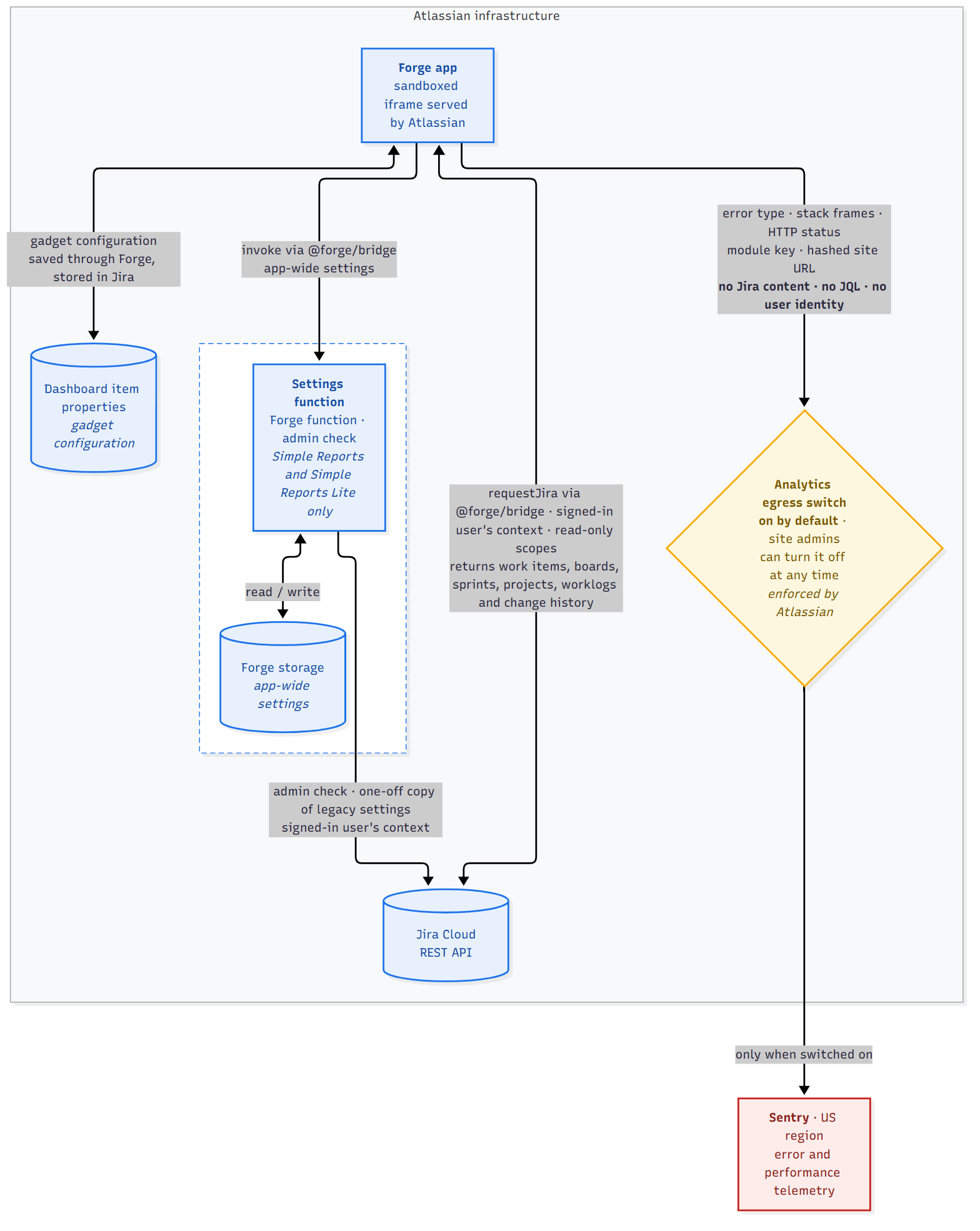
Exactly one path leaves Atlassian infrastructure. It carries no customer content, and it passes through a switch your administrator controls.
Personal Data Handling
-
No customer data collection: We do not process, store, or share your Jira content.
-
Licensing and Transactional Data: We gather only the necessary licensing and transactional information from Atlassian's Marketplace API to manage license validation and record transactions.
-
Error Logging: Non-personal error and performance data is collected via Sentry for debugging. This can be disabled at any time – see Turning error reporting off below. Sentry is our only subprocessor for this data, and our current subprocessor list is published on our Trust Center.
What is sent to error monitoring
Events are sent from your browser to Sentry's United States region, and contain:
-
Error details – the error type, message, and stack frames from our own application code.
-
HTTP outcome data – status code, status text, and retry information for failed Jira API calls. Status codes are kept deliberately: they are what makes a fault diagnosable.
-
Request path – the API path of a failed call, with the query string removed.
-
Performance traces – page and interaction timings, sampled at a tenth of sessions.
-
Which part of the app was in use – an internal module identifier, for example the name of the gadget.
-
A pseudonymous site identifier – a one-way hash of your Jira site address. This lets us tell whether a fault affects one customer or many. It cannot be reversed to a site name, and it identifies a site, never a person.
-
A narrow set of application log messages – three specific message types only, covering rate limiting and configuration errors.
What is never sent
-
No Jira content. No work item summaries, descriptions, comments, field values, worklogs, attachments, or project data.
-
No JQL. Query strings are removed from every address before transmission, because a JQL query can name a person.
-
No Jira API response bodies. Response payloads are removed before an event leaves your browser; only the status code survives.
-
No user identities. No account IDs, names, email addresses, usernames, or avatars.
-
No credentials. Our apps never collect, store, or transmit passwords, API tokens, or personal access tokens.
-
No location data. Geolocation is removed from every event.
-
No browser storage contents, cookies, or form input.
-
No record of what you click. Interaction tracking is switched off, because labels on elements in our reports can themselves contain Jira content – an assignee's name on an avatar, for example.
These exclusions are enforced in code, not by policy alone. Personally identifiable information is disabled at the reporting level, application state is excluded from error reports, and every outgoing event passes through a filter that removes response bodies and query strings before transmission. Application log messages are restricted to an explicit list, so a message that is not on that list is discarded rather than sent.
Turning error reporting off
Error reporting is on by default, and you can turn it off at any time.
It is declared in each app's Forge manifest as an analytics egress, which means Atlassian provides the control rather than us. A site or organisation administrator can disable analytics and logs access for apps from Jira's app administration screens. When it is switched off, nothing is sent to Sentry at all – the request is blocked by Atlassian at the platform level, not merely skipped by our code.
Our apps continue to work normally with error reporting disabled; no feature depends on it. The only effect is on us: faults on your site stop being reported automatically, so we depend on you telling us when something breaks.
Whether analytics access is enabled by default is set by the Atlassian platform, not by us. Declaring the egress as analytics is what gives your administrators the control; we cannot make it default to off. What we can tell you is what the data contains – no user identity and no customer content, only crash and performance data about our own code, which lets us find and fix faults, often before anyone reports them. If your organisation would rather it were off, the switch is yours and needs no request to us.
Data Retention and Deletion
Error and performance data sent to Sentry is retained for 30 days, after which it is deleted automatically by Sentry. This applies to everything we send – error events, performance traces, and application log messages alike. We do not archive it elsewhere, and we do not copy it into any other system.
Because these apps store no customer data outside Atlassian, this is the only data covered by this retention policy. Configuration stored in Jira or in Forge storage is governed by Atlassian's retention terms, not ours. Forge storage is deleted by Atlassian 28 days after the app is uninstalled.
-
Automatic deletion. Events are deleted at the end of the retention period above. No action is required by you.
-
On uninstall. No further data is generated once an app is removed. Any events already collected age out under the retention period.
-
On request. You may ask us to delete data associated with your Jira site before it expires. Because events carry a hash of your site address, we can locate and remove your site's events. Contact info@simple-reports.com.
Requests concerning an individual. The data described here contains no user-level identifier, so there is nothing within it that can be linked to a named person and therefore nothing to erase on an individual basis. Requests concerning an identified person's data held in Jira itself should be directed to Atlassian, as the controller of that data.
Infrastructure Security
-
Hosted on Atlassian Forge: Our app runs within Atlassian's Forge platform, hosted on Atlassian-managed infrastructure. All data access, storage, and execution are governed by Atlassian's cloud architecture and security controls.
-
Encryption in Transit: All communication that delivers our application to Jira is secured with TLS 1.2+.
-
Regular Security Scans: Automated vulnerability scans detect and mitigate potential risks.
Data Center Version
Architecture & Data Flow
-
Self-Hosted Deployment: The app runs entirely within your Jira instance.
-
No External Communication: No data is ever transmitted to external servers. Error reporting is disabled entirely in the Data Center build – nothing is sent to Sentry or anywhere else.
-
Full Data Control: Your data stays within your infrastructure at all times.
Personal Data Handling
-
No Data Collection: We do not collect, store, or transmit any customer data externally.
-
Complete Sovereignty: All data remains within your environment.
Infrastructure Security
-
Operates in Your Environment: All security measures align with your existing Jira and network controls.
-
No Third-Party Dependencies: No external calls or services are involved.
Compliance & Certifications
-
SOC 2 Type II Certified: Independently audited for security controls.
-
Runs on Atlassian: Hosted on Atlassian infrastructure, with data stored and processed within Atlassian and fully data-residency compliant.
-
Bug Bounty Participation: Continuous independent testing by verified security researchers to ensure ongoing protection.
Secure Development Practices
-
Automated Dependency Scanning: Third-party dependencies are scanned continuously, and reported vulnerabilities are tracked to resolution against defined response times.
-
Secure CI/CD: Every build runs automated security checks – secret scanning, dependency vulnerability gating, and static analysis – and a build that fails them cannot be deployed.
AI Usage
The Simple Reports App Suite does not include AI or machine-learning features and does not send customer data to any AI or large language model service. If an AI feature is introduced, we will publish an AI usage policy before it is released.
Incident Response & Reporting
We have a well-defined incident response plan to detect, assess, and resolve security incidents:
-
Continuous automated monitoring: Dependency vulnerabilities and application errors are monitored continuously and raise alerts to our team. Alerts are triaged during business hours, with security incidents escalated on the timelines set out in our incident response process.
-
Prompt threat response: Confirmed security vulnerabilities are prioritised above other work.
-
Customer notifications if an incident has any impact.
How to Report Security Issues
We encourage responsible disclosure of security vulnerabilities.
📩 Report a security issue: info@simple-reports.com
Updates & Change Management
-
Continuous Deployment: The cloud version receives frequent security updates.
-
Change Tracking: All deployments are logged and monitored.
-
Backward Compatibility: Updates do not break existing user configurations.